Post Purchase Survey
A post-purchase survey is a short customer feedback form sent after an order to capture the reasons, ratings and channels behind a purchase. The post-purchase survey collects zero-party data, product satisfaction ratings and marketplace attribution from verified buyers. GetReviews delivers the survey by email, SMS or QR insert, validates the order number and offers follow-up help to buyers who report a problem.
Cancel anytime
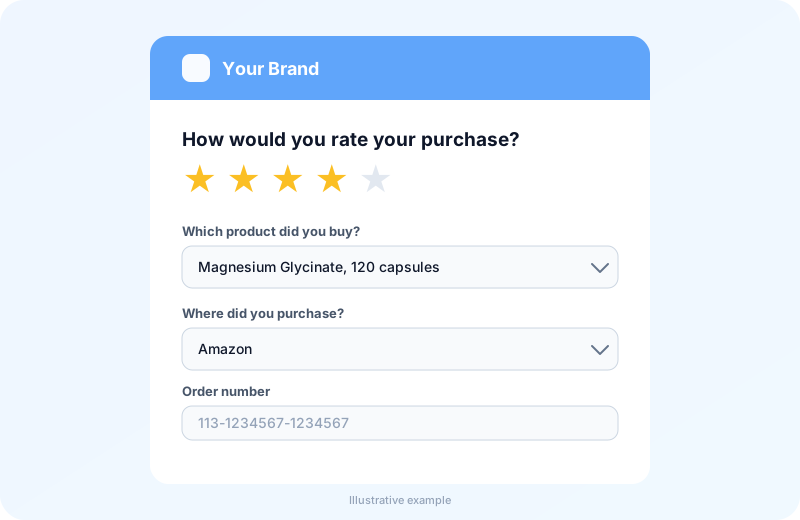
Want to see a live survey? Book a demo and we will walk you through one.
What Is a Post-Purchase Survey in E-commerce?
A post-purchase survey in e-commerce is a questionnaire that an online store sends to a buyer after checkout or delivery to record satisfaction, purchase motivation and purchase channel. The questionnaire belongs to the class of customer feedback surveys, beside the NPS survey and the review request. The questionnaire differs from a pre-purchase survey since the respondent has already paid for and received the product. A verified order is the condition that separates a post-purchase survey from a site poll.
What Does a Post-Purchase Survey Measure?
A post-purchase survey measures product satisfaction, delivery experience, purchase attribution, product use and repurchase intent. The 5 measures map to the 5 question groups described below. Satisfaction is recorded on a rating scale. Attribution is recorded as a marketplace or channel choice. Repurchase intent is recorded as a loyalty answer. The 5 measures group into 4 survey types.
What Are the 4 Types of Post-Purchase Surveys?
There are 4 types of post-purchase surveys based on the data each one collects. The types are the behavioral survey, the attribution survey, the checkout experience survey and the product development survey.
- Behavioral survey: asks who the product is for and how often the buyer replaces it.
- Attribution survey: asks where the buyer heard about the brand and what influenced the purchase decision.
- Checkout experience survey: asks what almost stopped the buyer from completing the order.
- Product development survey: asks which feature mattered most and which product the buyer wants next.
Picking a type fixes the question set before the survey mechanism runs.
How Does a GetReviews Post-Purchase Survey Work?
A GetReviews post-purchase survey works by linking a buyer to an order, collecting a rating and review text, and offering follow-up help when a buyer reports a problem. The buyer opens the survey link from an email, an SMS or a QR insert. The survey asks for the order number and the marketplace where the purchase happened. The order number is checked against the store’s order data. Buyers whose rating falls under the threshold the brand sets are also offered a way to send feedback to the seller. Order number validation is the first step.
How Does Order Number Validation Confirm a Real Buyer?
Order number validation confirms a real buyer by matching the number the customer types against orders imported from the connected marketplace or store. A matched order marks the respondent as a verified buyer. An unmatched order number returns an error and does not become a response. Verification keeps unverified entries out of the response data, and a validated order number can be used once.
How Does Support Follow-Up Work for Low Ratings?
Support follow-up works by offering a way to contact the brand to buyers whose rating falls under the threshold the brand sets. The brand sets the threshold in the survey settings. When the buyer leaves written feedback and contact details, GetReviews alerts the team with the order and the contact so support can follow up on the problem.
Follow-up is an addition to the review request and never a replacement for it. Amazon’s Request a Review goes to every eligible order on the same schedule, independent of survey answers.
When Should a Post-Purchase Survey Be Sent?
A post-purchase survey should be sent after delivery, once the buyer has used the product. The ideal time for a product satisfaction survey is when the product has arrived and been used. An attribution survey works best close to checkout, when the buyer still remembers what influenced the purchase, and GetReviews is built around the post-delivery product survey. A participation delay setting holds the survey until the delivery window has passed. Send timing pairs with the delivery channel.
Which Channels Deliver Post-Purchase Surveys?
GetReviews delivers post-purchase surveys through 3 channels: a follow-up email, an SMS message and a package-insert QR code. The channels are listed below.
- Follow-up email: carries a survey link days after the order.
- SMS message: carries the survey link by text.
- Package-insert QR code: opens the survey when the buyer scans the card inside the box.
Matching the channel to the survey type raises the response rate, which is the payoff brands run surveys for.
Why Do Ecommerce Brands Run Post-Purchase Surveys?
Ecommerce brands run post-purchase surveys to capture zero-party data, hear about product problems early and improve products and listings. There are 3 reasons. The reasons are zero-party data, early feedback and product improvement. Zero-party data feeds segmentation and flows. Early feedback reaches the support team while the buyer is still engaged. Product improvement turns repeated answers into listing and product changes. The first reason is zero-party data.
What Is Zero-Party Data in Post-Purchase Feedback?
Zero-party data in post-purchase feedback is information a customer shares on purpose, such as purchase motivation, product preferences and buying habits. Zero-party data differs from behavioral data since the customer states it rather than the store inferring it from clicks. An answer such as “bought as a gift” is zero-party data. When the buyer ticks the marketing opt-in, the answer can be sent to connected marketing tools for segmentation. Stated preferences feed retention marketing, and early feedback helps the brand act on them.
How Does Early Feedback Help Fix Product Problems?
Early feedback helps fix product problems by surfacing a complaint inside the survey while the order is still fresh. A rating under the threshold offers the buyer a way to send feedback, and the team is alerted when contact details are included. The support team can resolve the delivery or product issue. Buyers stay free to review however they choose. The questions that surface the complaint are described next.
Which Questions Should a Post-Purchase Survey Ask?
A post-purchase survey should ask 5 groups of questions covering satisfaction, delivery, purchase channel, product use and loyalty. There are 5 question categories. The categories are product satisfaction, delivery and packaging, purchase channel and attribution, product use and expectation, and loyalty and recommendation.
1. Product Satisfaction Questions
Product satisfaction questions ask how well the product met the buyer’s needs on a rating scale. The category includes “How satisfied are you with the product?” and “Which feature mattered most to you?” Brands read the satisfaction score as the headline survey metric.
2. Delivery and Packaging Questions
Delivery and packaging questions ask whether the order arrived on time and undamaged. Two sample questions are “Did your order arrive on time?” and “Was the packaging intact?” A delivery answer separates a fulfilment complaint from a product complaint. Brands pass delivery answers to the fulfilment team.
3. Purchase Channel and Attribution Questions
Purchase channel and attribution questions ask where the buyer purchased and how the buyer found the brand. The group covers “Where did you purchase this product?” and “How did you hear about us?” An attribution answer pinpoints the marketing channel that drove the purchase decision. Brands compare attribution answers against ad spend by channel.
4. Product Use and Expectation Questions
Product use and expectation questions ask what problem the buyer wants the product to solve and whether it matched the listing. Sample wording is “What problem are you hoping this product solves?” and “Did the product match the description?” An expectation answer reveals listing copy that oversells. Brands rewrite product pages from expectation gaps.
5. Loyalty and Recommendation Questions
Loyalty and recommendation questions ask whether the buyer will purchase again and recommend the brand. The group holds “How likely are you to buy from us again?” and “Would you recommend this product to a friend?” A loyalty answer flags repeat customers for retention campaigns. Brands treat recommendation intent as an advocacy signal.
Rating Scales, Multiple Choice or Open Text: Which Format Fits Each Question?
The format that fits each question is a rating scale for satisfaction and loyalty, multiple choice for delivery and attribution, and open text for product use. There are 3 formats. The formats are the rating scale, multiple choice and open text.
- Rating scale: scores a feeling on a fixed range and sets the feedback threshold.
- Multiple choice: picks one option from a closed list and records attribution.
- Open text: records the buyer's own words and feeds product development.
Matching the format to the question shortens the survey, and the survey length is one of the settings a brand configures.
What Can You Configure in a GetReviews Post-Purchase Survey?
A GetReviews post-purchase survey lets you configure 8 settings covering appearance, wording, products, marketplace, optional fields, timing, tracking code and redirect. There are 8 configurable settings. The first 4 settings are brand logo, themes and background images; custom survey wording; product dropdowns for multi-product brands; and the “Where did you purchase?” marketplace question. The other 4 settings are optional phone and country fields; participation delay after purchase; tracking pixels for analytics and ad platforms; and redirect after survey completion.
1. Brand Logo, Themes and Background Images
Brand logo, themes and background images set the visual identity of the survey page. The logo appears at the top of the form. The layout and theme control the look of the form, and the background image sits behind it. Brands match the survey to the package insert.
2. Custom Survey Wording
Custom survey wording sets the text of the questions, buttons and thank-you message. The wording is edited per survey, so a brand writes each question in its own voice. Surveys are available in several languages, and brands adapt the wording for each market.
3. Product Dropdowns for Multi-Product Brands
Product dropdowns for multi-product brands let a buyer pick the exact product purchased from a list before rating it. The dropdown ties the rating to one product, so a mixed catalog avoids blended feedback across items.
4. The “Where Did You Purchase?” Marketplace Question
The “Where did you purchase?” marketplace question records the store or marketplace where the order was placed. The answer decides which order list validates the order number. Brands also count the answer as marketplace attribution.
5. Optional Phone and Country Fields
Optional phone and country fields collect contact and location details the brand chooses to switch on. The phone field enables follow-up by phone or SMS, and the country field helps localize replies. Brands enable only the fields the survey needs.
6. Participation Delay After Purchase
Participation delay after purchase sets the number of days that must pass after the order date before a buyer can take the survey. The delay gives the product time to arrive and be used. A survey opened before the delay ends shows a wait message. Brands set the delay to match the delivery window.
7. Tracking Pixels for Analytics and Ad Platforms
Tracking pixels for analytics and ad platforms are code snippets a brand pastes into the survey page. The snippets load with the survey, so analytics and ad tools such as Google and Meta can measure survey traffic. Brands add only the code their platforms direct them to install.
8. Redirect After Survey Completion
Redirect after survey completion sends the buyer to a chosen URL after the last survey step. The URL is a thank-you page, a product page or another destination the brand picks. The redirect is set per survey.
Setting the 8 options decides the experience of every response.
Where Do Post-Purchase Survey Responses Go?
Post-purchase survey responses go to the GetReviews response dashboard, where each response is stored against its validated order. Responses can be reviewed and exported. When the buyer ticks the marketing opt-in, the response is also sent to connected tools such as Klaviyo, Mailchimp, Zapier and Google Sheets. Storage of every response follows the review and consent rules.
How Do Post-Purchase Surveys Stay Within Review and Consent Rules?
Post-purchase surveys stay within review and consent rules by keeping offers, follow-up, word filters and marketing opt-in independent of the rating a buyer gives. There are 4 compliance rules. The rules are independent completion offers, support follow-up alongside the review request, blocked-word filters for review text and explicit marketing opt-in.
Survey Completion Offers That Stay Independent of Reviews
A survey completion offer is a reward given for finishing the survey, not for writing a review. The offer should be available to every buyer who completes the survey. It must not depend on the rating or on whether a review is posted. Brands label the offer as a survey incentive in every message.
Support Follow-Up Alongside the Review Request
Support follow-up is a way for a buyer to reach the brand when something went wrong. It offers help without replacing anything else. Amazon’s Request a Review goes to every eligible order on the same schedule, independent of survey answers. Brands keep help and review requests as separate steps.
Blocked-Word Filters for Review Text
A blocked-word filter is a list of words the survey rejects in review text. Brands use the filter to screen profanity and personal data. The list is set per survey, and it does not steer buyers toward a rating.
Marketing Opt-In and Customer Consent in Surveys
Marketing opt-in in a survey is a checkbox the buyer ticks to receive marketing messages. The checkbox is unticked by default. A response without the opt-in is not sent to email marketing tools. Brands store the opt-in state with the response.
Following the 4 rules keeps survey data usable, which is the first test when choosing a tool.
How to Choose a Post-Purchase Survey Tool
Choose a post-purchase survey tool by matching its timing, validation, follow-up and marketplace reach to the store’s sales channels. There are 4 selection criteria. The criteria are timing options, order validation, support follow-up and marketplace coverage. Timing options decide whether the tool surveys at checkout or after delivery. Order validation decides whether responses count as verified. Support follow-up decides whether problems reach your team. Marketplace coverage decides which stores the survey serves. Timing separates two sibling surveys.
Checkout Attribution Surveys vs Post-Delivery Product Surveys
A checkout attribution survey and a post-delivery product survey are both post-purchase surveys. The two differ in timing, question focus, respondent state and primary use. The table below compares the two.
| Dimension | Checkout attribution survey | Post-delivery product survey |
|---|---|---|
| Timing | On the order confirmation page | Days after delivery |
| Question focus | How did you hear about us | How satisfied are you with the product |
| Respondent state | Has paid, has not received | Has received and used |
| Primary use | Marketing attribution | Product ratings, reviews and support follow-up |
| Common misreading | Measures satisfaction? No, the product has not arrived | Measures attribution? No, the ad memory has faded |
A checkout attribution survey owns the marketing question, and a post-delivery product survey owns the product rating.
Post-Purchase Survey vs Warranty or Product Registration Form
A post-purchase survey and a warranty or product registration form both collect buyer details after an order. The two differ in purpose, required fields, outcome and owner. The table below sets the two side by side.
| Dimension | Post-purchase survey | Warranty or product registration form |
|---|---|---|
| Purpose | Rate the product and the purchase | Register ownership for a warranty claim |
| Required fields | Order number and rating | Serial number and purchase date |
| Outcome | Rating, feedback or customer segment | Warranty record |
| Owner | Marketing and support teams | Legal and service teams |
| Common misreading | A registration form collects feedback? No, it collects proof of ownership | A survey grants a warranty? No, it grants nothing |
A warranty form registers the product, and a post-purchase survey rates it. Each output reaches a different team.
Which Teams Use Post-Purchase Survey Data?
Post-purchase survey data is used by 4 teams: product development, customer support, retention marketing and marketplace account management. The teams are listed below.
Product Development Teams
Product development teams use feature requests and expectation gaps from open-text answers. The answers flag a missing feature or a misleading listing. Product managers rank requests by response count.
Customer Support Teams
Customer support teams use feedback alerts from buyers who report a problem. The alert carries the order and contact details, so the team can follow up on the issue. Support agents close the issue from the survey response.
Retention Marketers
Retention marketers use zero-party data and loyalty answers sent to their marketing tools. Gift buyers and repeat customers form separate segments. Marketers time campaigns to replacement cycles.
Marketplace Account Managers
Marketplace account managers use the “Where did you purchase?” answer. The answer shows which marketplace drives orders. Account managers track review volume per listing.
Sharing one response set across the 4 teams removes the need for 4 separate surveys, which is the question most often asked about survey setup.
Related Resources
Pricing
Compare GetReviews plans, monthly and yearly.
Amazon Review Software
Automate Amazon Request a Review for eligible orders.
Product Review Software
The full review collection platform for ecommerce brands.
QR Code Review Software
Turn packaging into a scannable post-purchase experience.
Survey Setup Guide
Build and brand your post-purchase survey.
Social Proof + UGC
Collect customer videos with consent and usage rights.
Post-Purchase Survey FAQs
Is a post-purchase survey the same as a review request?
No. A post-purchase survey collects ratings and answers about the order, while a review request asks the buyer to post a public review. GetReviews offers both, and Amazon's Request a Review goes to every eligible order regardless of survey answers.
How many questions should a post-purchase survey have?
A post-purchase survey should hold 3 to 5 questions, since each added question lowers the completion rate.
Does a post-purchase survey give a discount for a review?
No. Amazon does not allow a discount or gift in exchange for a review. Any survey offer should be for finishing the survey and shown to every buyer regardless of rating or review.
Does a post-purchase survey work for marketplace orders?
Yes. A post-purchase survey works for marketplace orders, since the order number is validated against the order list imported from the marketplace.
Does a buyer take the survey twice?
No. A buyer does not take the survey twice, since a validated order number can be used once.
What happens to a low rating in a post-purchase survey?
When a rating falls under the threshold you set, the buyer is offered a way to send feedback to your team. When the buyer leaves written feedback and contact details, GetReviews alerts your team so support can follow up.
Is post-purchase survey data zero-party data?
Yes. Post-purchase survey data is zero-party data, since the buyer states every answer directly.
Does a post-purchase survey need a consent checkbox?
Yes. A post-purchase survey needs a consent checkbox for marketing use, since an unticked opt-in keeps the response out of email marketing tools.
Does one post-purchase survey cover multiple products?
Yes. One post-purchase survey covers multiple products, since the product dropdown ties each rating to the item selected.
Ready to Turn Every Order Into More Reviews?
Set up your first campaign in minutes.
Get Started